



Introduction
In the modern e-commerce landscape, the “personalized customization” trend is booming. Consumers are no longer satisfied with flat, generic, mass-produced items. From tech accessories to daily gear, people want high-definition, wrap-around designs that reflect their unique style.
If you run an Etsy shop, a custom printing business, or are a DIY crafting enthusiast, you’ve likely encountered a major roadblock: printing on curved surfaces.
Traditional sublimation paper is fantastic for flat surfaces like T-shirts or mouse pads, but the moment you try to wrap it around the curved edge of a phone case, a gaming keycap, or an earphone cover, you end up with ugly white borders, creases, or ghosted prints.
The solution? 3D sublimation transfer film.
In this comprehensive guide, we will break down what A4 sublimation film is, how it works, why it outperforms sublimation paper for three-dimensional objects, and provide a step-by-step tutorial to help you achieve professional-grade results.
1. What Is A4 Sublimation Film?
A4 sublimation film is a high-performance, ultra-thin transfer medium engineered specifically for 3D vacuum sublimation transfer technology. Unlike paper, which is rigid and fibrous, sublimation film is made of an elastic, synthetic base.
The Material Construction
- PET Substrate Base:The film is constructed from a specialized polyethylene terephthalate (PET) substrate. This material has excellent heat resistance, dimensional stability, and—most importantly—high extensibility and flexibility when exposed to heat.
- Proprietary Absorption Coating:The matte side of the film is coated with a high-absorption polymer layer. This coating is chemically engineered to lock in sublimation ink during printing and release it rapidly under heat and pressure.
The Science Behind 3D Sublimation
Sublimation is a chemical process where a substance transitions directly from a solid state to a gaseous state without passing through a liquid phase.
When you print a design onto sublimation film and place it in a sublimation 3D vacuum machine:
- The vacuum suction draws the elastic PET film tightly against the irregular or curved contours of your blank.
- At temperatures between 130℃and 140℃, the solid ink dyes on the film turn into a gas.
- Because of the tight, uniform pressure of the vacuum, these dye gases deeply penetrate the molecular structure of the polymer blank (like a PBT keycap or a coated PC/TPU phone case) rather than just sitting on the surface.
This process—known as molecular infiltration—creates a scratch-resistant, permanent bond, ensuring the print will never peel, fade, or wear off over time.
Why A4 Size (210×297mm) is the Perfect “Sweet Spot”
While sublimation film is available in rolls or larger sheets (like A3), the A4 size is highly recommended for beginners, DIYers, and small-to-medium studios for several reasons:
- Printer Compatibility:It fits perfectly into standard, cost-effective desktop sublimation printers without requiring expensive wide-format equipment.
- Zero Waste:One sheet of A4 film is the perfect size to cover two phone cases, a set of earphone cases, or multiple keycaps. It minimizes material waste and lowers your unit cost.
- Easy Handling:A4 sheets are much easier to align, cut, and handle inside compact 3D vacuum machines compared to unwieldy roll materials.
2. Sublimation Film vs. Sublimation Paper: What’s the Difference?
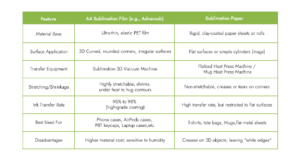
To understand why sublimation film is a game-changer, let’s look at how it compares to traditional sublimation paper:
Why Sublimation Film Wins for 3D Objects
Paper cannot stretch. If you try to wrap paper around a spherical or curved corner (like a phone case or an AirPods case), it must fold. These folds create air gaps, preventing heat and pressure from reaching the blank. The result is uneven printing, faded colors, and unsightly white creases.
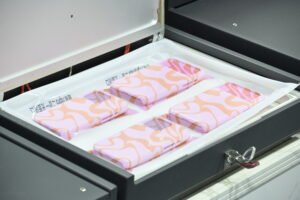
Sublimation film, under the influence of vacuum heat, behaves like a second skin. It softens, stretches smoothly over rounded corners, and shrinks to wrap around curves perfectly, ensuring edge-to-edge, seamless custom printing.
3. Step-by-Step Guide: How to Use A4 Sublimation Film
If you are new to 3D sublimation, do not worry! The process is highly repeatable and simple once you understand the core parameters. Here is a practical step-by-step guide.
Step 1: Gather Your Tools & Materials
Before starting, ensure you have:
- Sublimation Printer:A standard desktop printer loaded with high-quality sublimation ink.(Recommend:EPSON4880C/7380)
- A4 Sublimation Film: We highly recommend the Advansub brand by Prosub for consistent 95%to 98%transfer rates.
- 3D Vacuum Sublimation Machine
- Compatible Blanks:High-temperature-resistant polymer blanks (such as Prosub’s blank 3D sublimation phone cases).
- Metal Jigs:Essential molds placed inside the blanks to prevent them from melting or warping under vacuum pressure.
Step 2: Mirror Printing
- Import your design into your graphic design software (Photoshop, Illustrator, etc.).
- Set your design to Mirror Image.
- Feed the A4 sublimation film into your printer. Important: Make sure you print on the matte, coated side of the film (not the shiny PET side).
Step 3: Thorough Ink Drying (The Crucial Step!)
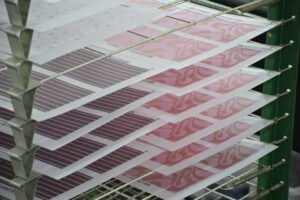
Because PET film is non-porous, sublimation ink sits on top of the chemical coating and takes longer to dry than it would on paper.
- Action: Place your freshly printed film in a dedicated drying oven at55℃ for approximately15(Also can use hair dryer)
- Why this matters:If the ink is not completely dry, the residual moisture will rapidly vaporize inside the high-temperature vacuum press, causing bubbles, blurry transfers, or “ghosting” effects.
Step 4: Sublimation Transfer
Place the product into a 3D vacuum sublimation machine.
Typical transfer parameters are:
- Temperature: 130–140°C
- Time: 4–6 minutes
The vacuum system ensures that the film tightly conforms to every curve and edge while the sublimation ink vaporizes and permanently bonds with the product’s coating.
Step 5: Peel and Reveal
Once the timer goes off, release the vacuum and carefully remove the hot item. Using heat-resistant gloves, gently peel the warm film off the product.
You will be left with a vibrant, high-definition, scratch-resistant print that covers every single curve and corner perfectly!
4. What Creative, High-Margin Products Can You Make?
A4 sublimation film unlocks a wide range of premium, high-profit products that traditional paper printers cannot touch:
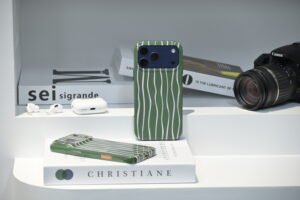
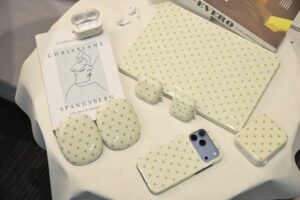
- 3D Phone Cases:Print seamless designs over the curved edges and side buttons of iPhone, Samsung, Huawei, Xiaomi, and Google Pixel cases with zero white gaps.
- Custom Wireless Earphone Cases:Wrap hard PC-coated AirPods cases 360° in anime graphics, custom branding, or vibrant textures.
- Mechanical Keyboard Keycaps:Print stunning gaming, aesthetic, or corporate layouts onto durable PBT keycaps. PBT combined with sublimation transfer results in keycaps that resist finger oils and never wear off, even under heavy gaming use.
- Irregular Home Decor & Serving Trays:Expand your catalog with custom-printed serving trays, curved ceramic plates, and unique glass or polymer accessories.
5. Pro Tips for Beginners to Avoid Common Pitfalls
To minimize your defect rate and ensure beautiful prints from day one, keep these tips in mind:
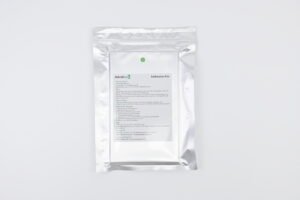
- Strict Humidity Control:Sublimation film coatings are highly sensitive to moisture. Keep your workspace relative humidity under 50%. Always store your unused film sealed tightly inside its original protective silver foil bag.
- Use the Right Blanks:Not all plastics can handle sublimation. You must use blanks made of high-temperature-resistant polymers (like PBT) or materials specifically coated with a polyester/sublimation blanks. Standard plastics will melt or warp at 30℃.
- Color Calibration (ICC Profiles):Colors on your screen may not match your printed product. Make sure to download and use the correct ICC printer profile calibrated for your specific ink and sublimation film combination to achieve rich, deep blacks and vivid reds.

6. Why prosub is the Choice of Custom Printing Pros
When starting a custom printing business, your reputation relies on consistency. Using cheap, unbranded sublimation films often leads to uneven stretching, low transfer rates, and faded colors.
This is why professional print shops trust Advansub, a premium brand developed by Dongguan Prosub Technology Co., Ltd.:
- Proprietary Coating Formula: Advansub sublimation film features an advanced, state-of-the-art polymer coating that guarantees an ink transfer rate of 95%to98%, yielding photo-grade clarity and rich color reproduction.
- 15 Years of Manufacturing Expertise:Prosub is a true vertical manufacturer. We develop our own coatings, design our own molds, and manufacture our own blank phone cases and keycaps in-house across over 33,000 square meters of production space. This allows us to eliminate middleman markups and offer factory-direct wholesale pricing.
- Full Technical Assistance:We don’t just sell you film. Prosub provides complete, end-to-end technical support—helping you calibrate your printer settings, adjust transfer temperatures, set up molds, and troubleshoot any issues.
Conclusion
A4 sublimation film is the ultimate key to unlocking high-margin, professional 3D customization. By letting go of flat paper and embracing the stretchable, vacuum-conforming power of PET film, you can produce stunning, full-wrap accessories that command premium prices in any online store or retail market.
Ready to take your sublimation business to the next level?Contact us today to inquire about bulk wholesale discounts, custom sizes, or to order your first sample pack!

